
Can you scan baseball cards? Yes, you can scan baseball cards using various methods, from dedicated scanners to smartphone apps. This process is crucial for preserving your collection’s digital history, assessing baseball card value, and aiding in baseball card grading and baseball card authentication. This guide will walk you through the best ways to capture high-quality images of your baseball cards and keep them safe.
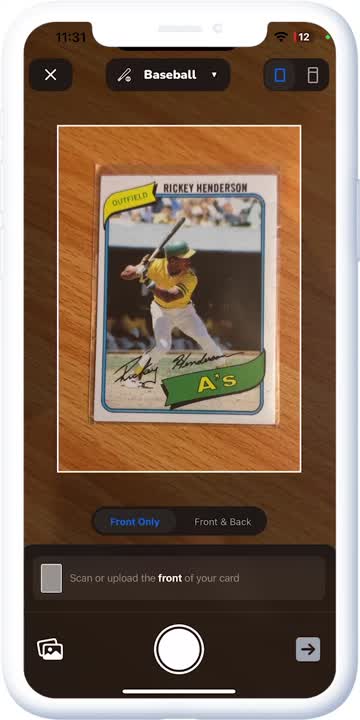
Image Source: cdn.prod.website-files.com
Why Scan Your Baseball Cards?
Digitizing your baseball card collection offers numerous benefits. It’s not just about having pretty pictures; it’s a practical step for collectors of all levels.
Preserving Your Investment
Baseball cards can be valuable. Over time, the physical cards can degrade due to light, humidity, and handling. Scanning creates a permanent digital record, safeguarding your collection against physical loss or damage. This is particularly important for rare and high-value cards where baseball card appraisal might be a consideration.
Facilitating Trading and Selling
When you want to trade or sell cards, clear, high-quality images are essential. Buyers want to see the card’s condition accurately. Good scanning baseball card images can significantly impact the perceived baseball card value and attract more potential buyers.
Digital Cataloging and Organization
A digital catalog makes managing your collection much easier. You can track acquisitions, monitor baseball card grading submissions, and quickly reference card details without handling the physical cards. This leads to efficient digital baseball card cataloging.
Sharing Your Collection
Showcasing your prized possessions to friends, family, or online communities is a joy for many collectors. High-resolution scans allow you to share the beauty and detail of your cards with others.
Insurance and Documentation
In the unfortunate event of theft or damage, having detailed digital records of your collection, including scans, can be invaluable for insurance claims. This documentation supports your baseball card authentication efforts if needed.
Choosing the Right Scanning Method
The “best way to scan baseball cards” depends on your budget, the size of your collection, and the desired quality. Here are the most popular and effective methods:
1. Flatbed Scanners
Flatbed scanners offer excellent image quality and are a reliable choice for serious collectors.
Advantages:
- High Resolution: Capable of capturing fine details, crucial for baseball card condition assessment.
- Consistent Quality: Provides uniform lighting and focus across the entire card.
- Minimal Handling: Once placed, the card remains undisturbed during the scan.
Disadvantages:
- Slower: Scanning individual cards can be time-consuming.
- Cost: Dedicated scanners can be an investment.
- Space: Requires desk space.
Best Practices for Flatbed Scanners:
- Clean the Glass: Ensure the scanner glass is spotless to avoid artifacts on your images.
- Use a Dark Background: Place cards on a plain black or white background on the scanner bed. This helps the scanner software isolate the card.
- Scan at High Resolution: Aim for at least 600 DPI (dots per inch) for maximum detail. This is vital for discerning even minor flaws that affect baseball card grading.
- Save as TIFF or PNG: These lossless formats preserve image quality. JPEG is lossy and can degrade images over time.
- Scan Front and Back: Always capture both sides of the card to document its complete condition.
2. Smartphone Scanning Apps
Modern smartphones have impressive cameras, and specialized apps can turn them into effective scanning tools. These are often the most convenient option, especially for a smaller collection or for quick cataloging.
Advantages:
- Convenience: You likely already have a smartphone.
- Portability: Scan cards anywhere, anytime.
- Ease of Use: Many apps are designed for quick, user-friendly operation.
- Cost-Effective: Often free or low-cost.
Disadvantages:
- Variable Quality: Image quality can depend heavily on lighting, camera stability, and app performance.
- Potential for Distortion: Angle and focus can be tricky to get right.
- Reflections: Glossy card surfaces can cause glare.
Popular Smartphone Scanning Apps:
- ScanPro: Known for its robust features and excellent edge detection.
- Adobe Scan: Integrates well with Adobe’s ecosystem and offers good OCR (Optical Character Recognition).
- Microsoft Lens: Another reliable option that can automatically crop and enhance images.
Baseball Card Photo Tips for Smartphone Apps:
- Find Good Lighting: Natural daylight is best. Avoid direct sunlight, which can cause harsh shadows and glare. Overcast days are ideal. If using artificial light, ensure it’s even and doesn’t create hotspots.
- Stable Surface: Place the card on a flat, stable surface.
- Positioning: Hold your phone directly above the card, parallel to the surface. Avoid tilting your phone, as this can cause distortion.
- Minimize Glare: Experiment with the angle of your phone and lighting to reduce reflections on the card’s surface. Sometimes, slightly shifting your position or the light source can make a big difference.
- Use the App’s Features: Most apps have features to automatically detect card edges, crop, and enhance images. Use these to your advantage.
- Focus Carefully: Tap your screen to ensure the camera focuses precisely on the card.
- Keep it Consistent: Try to use the same lighting and positioning for all your scans for a uniform look in your digital catalog.
3. Dedicated Digital Cameras
Using a DSLR or mirrorless camera can yield professional-quality results, especially if you’re serious about documenting your collection.
Advantages:
- Superior Image Quality: Best for capturing detail and color accuracy.
- Control Over Settings: Allows fine-tuning of focus, aperture, and exposure.
- Flexibility: Can be used with various lighting setups and backgrounds.
Disadvantages:
- Cost: Cameras and necessary accessories (tripod, lighting) can be expensive.
- Learning Curve: Requires some photography knowledge.
- Time Consuming: Setting up and taking each shot takes time.
Setting Up for Camera Scans:
- Tripod: Essential for sharp, blur-free images.
- Macro Lens (Optional but Recommended): Allows for close-up shots with excellent detail.
- Lighting: Use two diffused light sources (like softboxes or natural light from windows) positioned at 45-degree angles to the card to minimize shadows and glare.
- Background: A neutral, non-reflective surface is ideal. Black or white felt or cardstock works well.
- Camera Settings:
- Aperture: Use an f-stop like f/8 or f/11 for good depth of field, ensuring the entire card is in focus.
- ISO: Keep it as low as possible (e.g., 100 or 200) to minimize digital noise.
- Shutter Speed: Adjust as needed to achieve correct exposure, often aided by the tripod.
- White Balance: Set it accurately to ensure true colors.
4. Card Scanners (Less Common but Exist)
There are some niche scanners designed specifically for trading cards. These can be expensive but offer a streamlined process for large collections. Research thoroughly before purchasing, as quality can vary.
Best Practices for Scanning Baseball Cards
Regardless of the method you choose, consistent practices will ensure your digital collection is organized, high-quality, and useful.
Resolution and File Format
- Resolution: For serious archiving and potential grading submissions, 600 DPI is highly recommended. For general cataloging and sharing, 300 DPI might suffice, but higher is always better for future use.
- File Format: Always save your scans in lossless formats.
- TIFF (.tif): The gold standard for archival purposes. It preserves all image data without compression.
- PNG (.png): Another lossless format, excellent for web use and general archiving. It supports transparency, though that’s not typically needed for cards.
- Avoid JPEG (.jpg): While it creates smaller files, JPEG uses “lossy” compression, meaning some image data is discarded with each save. This can degrade the image quality, especially noticeable on fine details relevant to baseball card condition assessment.
Naming Conventions
A clear naming system is vital for digital baseball card cataloging. Consider a structure that includes:
- Year
- Brand (e.g., Topps, Bowman, Upper Deck)
- Card Number
- Player Name
- Condition (optional, e.g., NM, Mint)
Example: 1987_Topps_538_McGwire_NM.png
Organization
- Folders: Create a logical folder structure, perhaps by year, brand, or player.
- Metadata: Many scanning apps and photo editing software allow you to add metadata (tags, descriptions). Use this to record details like purchase date, price, or grading status.
Color Accuracy
Ensure your scanner or camera settings are calibrated for accurate color reproduction. This is important if you plan to use the scans for baseball card grading or baseball card authentication, as color is a factor.
Preserving Your Scanned Images
Once you’ve created your high-quality scans, you need to protect them.
Backup Strategy
- Multiple Copies: Never rely on a single copy of your digital files.
- External Hard Drives: Store copies on reputable external hard drives.
- Cloud Storage: Services like Google Drive, Dropbox, or iCloud are excellent for offsite backups.
- NAS (Network Attached Storage): For larger collections, a NAS device can provide a centralized, accessible storage solution with built-in redundancy.
File Maintenance
- Regular Checks: Periodically check your backup files to ensure they are not corrupted.
- Format Updates: As technology evolves, consider migrating your files to newer, more stable formats if necessary, though TIFF and PNG are very stable.
Enhancing Your Scans for Better Presentation and Analysis
After scanning, you can often improve your images to make them clearer, more visually appealing, and more informative.
Cropping
Remove any unnecessary background or scanner bed artifacts. Ensure the crop is tight around the card’s edges without cutting into the border.
Adjusting Brightness and Contrast
If the scan is too dark or washed out, subtle adjustments can improve clarity. Be careful not to overdo it, as this can introduce artifacts or alter the perceived color.
Sharpening
A slight sharpening can enhance the card’s details, making text and images crisper. Again, use sparingly to avoid creating an unnatural look.
Removing Glare
Advanced photo editing software can sometimes help reduce or remove glare spots, though it’s best to minimize glare during the scanning process itself.
Color Correction
If the colors appear off, you can use color correction tools to bring them closer to the original card’s appearance. This is particularly relevant for baseball card grading, where color can be a factor in the assessment.
Using Scans for Grading and Authentication
High-quality scans are increasingly important for collectors involved in baseball card grading and baseball card authentication.
Preparing for Grading Services
- Clear Images: Grading services like PSA or Beckett require clear, high-resolution images of both the front and back of the card.
- Accurate Representation: Your scans should accurately depict the card’s condition. Falsely representing a card’s condition through manipulation can lead to issues with grading services.
- Specific Requirements: Check the specific image submission guidelines of your chosen grading service.
Documentation for Authentication
- Proof of Ownership: Scans can serve as a record of your collection.
- Identifying Features: High-resolution scans help in documenting unique printing plates, ink variations, or other features that might be relevant for authentication.
Advanced Techniques and Considerations
For those looking to take their scanning to the next level:
Batch Scanning Software
If using a flatbed scanner, look for software that supports batch scanning. This allows you to place multiple cards (if the scanner bed is large enough and you are careful about placement) and have the software automatically detect, crop, and save each one.
Lighting Booths
For consistent, professional lighting, consider a small, portable lighting booth. These provide diffused, even light from multiple angles, dramatically reducing shadows and glare.
Specialized Software for Cataloging
Beyond basic file management, consider software designed for sports card collecting. These often have built-in databases, allow you to link scans to specific card entries, and can help track your collection’s baseball card value.
Common Challenges and How to Overcome Them
Glare and Reflections
- Solution: Experiment with lighting angles. Use a polarizing filter on your camera lens if using a digital camera. For flatbed scanners, try placing a black matte board over the card and scanner glass to reduce ambient light reflection.
Uneven Lighting and Shadows
- Solution: Use multiple, diffused light sources. Avoid using a single flash directly on the card.
Card Curvature
- Solution: Gently press the card flat against the scanner glass or surface. For very stubborn cards, a protective sleeve might provide a flatter surface.
Dust and Smudges
- Solution: Clean your scanner glass regularly. Use a soft microfiber cloth or a can of compressed air to gently clean the card surface before scanning. Handle cards with cotton gloves if possible.
Conclusion
Scanning baseball cards is an essential practice for any serious collector. It protects your investment, enhances your ability to trade and sell, and creates a valuable digital archive of your passion. By choosing the right method, adhering to best practices for scanning baseball card images, and focusing on quality, you can ensure your collection is well-documented, preserved for years to come, and its baseball card value is accurately represented. Whether you’re a seasoned collector focused on baseball card grading or just starting your journey, taking the time to scan your cards properly is a step that will pay dividends.
Frequently Asked Questions (FAQ)
What is the best scanner for baseball cards?
The “best” scanner depends on your needs. For the highest quality, a good flatbed scanner (like Epson Perfection series) is excellent. For convenience and portability, a high-quality smartphone with a good scanning app (like ScanPro or Adobe Scan) is ideal. For ultimate control and professional results, a DSLR camera with a macro lens is the top choice.
Can I use my phone to scan baseball cards for grading?
While you can use your phone for scanning, grading companies often prefer high-resolution scans from dedicated scanners or cameras. Always check the specific image submission guidelines of the grading service you plan to use. If using a phone, ensure your lighting is excellent, the image is sharp, and you capture both front and back clearly.
How do I prevent glare when scanning glossy baseball cards?
Glare is a common issue. Try adjusting the angle of your light source or camera/scanner. Using a polarizing filter on a camera lens can also help. For flatbed scanners, experiment with placing a matte black cardstock or a piece of felt over the card and scanner glass to reduce ambient light reflections.
What resolution should I scan my baseball cards at?
For archiving and potential baseball card grading, scanning at 600 DPI (dots per inch) is highly recommended. This captures the most detail. For general cataloging and sharing, 300 DPI might be sufficient, but higher is always better for future use.
What file format is best for scanned baseball cards?
The best file formats are lossless ones: TIFF (.tif) or PNG (.png). These formats preserve all the image data without compression, ensuring the highest quality for your scans, which is crucial for baseball card condition assessment. Avoid JPEG (.jpg) as it uses lossy compression and can degrade image quality.
How do I catalog my scanned baseball cards?
You can create a digital catalog using spreadsheets (like Excel or Google Sheets), dedicated sports card inventory software, or by organizing your image files with a consistent naming convention and folder structure. Many software options allow you to link scanned images directly to card details, making digital baseball card cataloging efficient.
Is it necessary to scan my entire baseball card collection?
It’s not strictly necessary to scan every single card, but it’s highly recommended for your most valuable cards or those you plan to grade or sell. Scanning provides a digital record that aids in baseball card value assessment and can be crucial for insurance or in case of loss.
How can scanning help with baseball card grading?
High-quality scans are essential for submitting cards to grading services. They allow the graders to see the card’s condition clearly, and for collectors, they serve as a reference point for comparison. Accurate scans help potential buyers assess the card’s condition before purchasing, influencing its baseball card value.
What are the key baseball card photo tips?
Key tips include: using good, diffused lighting (natural light is often best); ensuring your camera or scanner is parallel to the card; holding the camera steady (use a tripod if possible); focusing precisely on the card; and minimizing glare by adjusting angles or using polarizing filters. Always scan the front and back.